Plan and manage shifts
Shift management turns “we need volunteers” into bookable times with clear capacity. It is the central tool for reception desks, distribution work, transport, sorting, translation, and other scheduled activities.
Design the shift task
First create an activity task whose unit is shift. Give it a clear name, useful note, location or remote setting, and deadline. Then add one or more shift slots with:
- start date and time;
- end date and time;
- number of people needed;
- optional weekday repetition up to the task deadline.
Shorter shifts are often easier to fill. If work passes between teams, plan an overlap for handover. The assistant can generate a proposed schedule from a window, shift length, capacity, and repetition rule.
Use the shift calendar
Open Manage → Shifts to see day, week, or month views. Filter by task or location. Each shift shows its open and total capacity and one of these states:
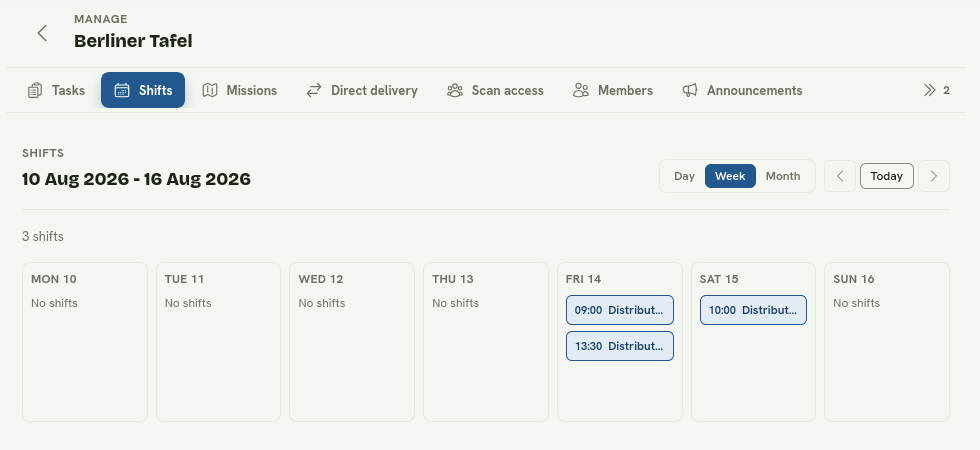
The week view makes gaps, overlaps, and the distribution of shifts easy to scan.
- Open: places remain;
- Full: all places are booked;
- Closed: the time ended or the shift was closed.
Open a shift to see its location, recurrence, and attendees with booked, checked-in, or aborted status. Use Manage in tasks when the slot or task needs editing.
Edit recurring shifts safely
Repeated slots belong to a series. Removing recurrence deletes future, unbooked instances while retaining past or booked ones. Check the summary before applying the change.
Check volunteers in
Booked volunteers see check-in instructions in their mission. Confirm attendance on site during the check-in window. Their mission becomes ongoing and completes after the scheduled period.
Call off a shift
Use Call off only when it cannot take place. Calling it off cancels every booking on that slot and notifies affected volunteers. Select or write an honest, specific reason; it is sent to them by email.
For ordinary capacity changes, edit future unbooked slots. Never remove a booked slot merely to avoid notifying its volunteers.
A coordinator’s routine
- Review the coming week and look for underfilled shifts.
- Confirm the location and the person responsible for check-in.
- Keep capacity realistic rather than collecting speculative bookings.
- Notify volunteers quickly when circumstances change.
- Review completed and missed attendance after the activity.