Volunteer for a shift
Shift tasks let an initiative say exactly when and how many people are needed. You choose a time that fits instead of making an open-ended offer.
Find an available shift
- Open Tasks and choose Activities.
- Search by activity or place; use the date filter when a particular day matters.
- Open Select time slots on a shift task.
- Review the start, end, location, and available places.
- Select one or more suitable slots and add them to your draft mission.
- Review and commit the mission to book them.
A full or ended slot cannot be booked. If you select several locations, adiuto may create separate missions.
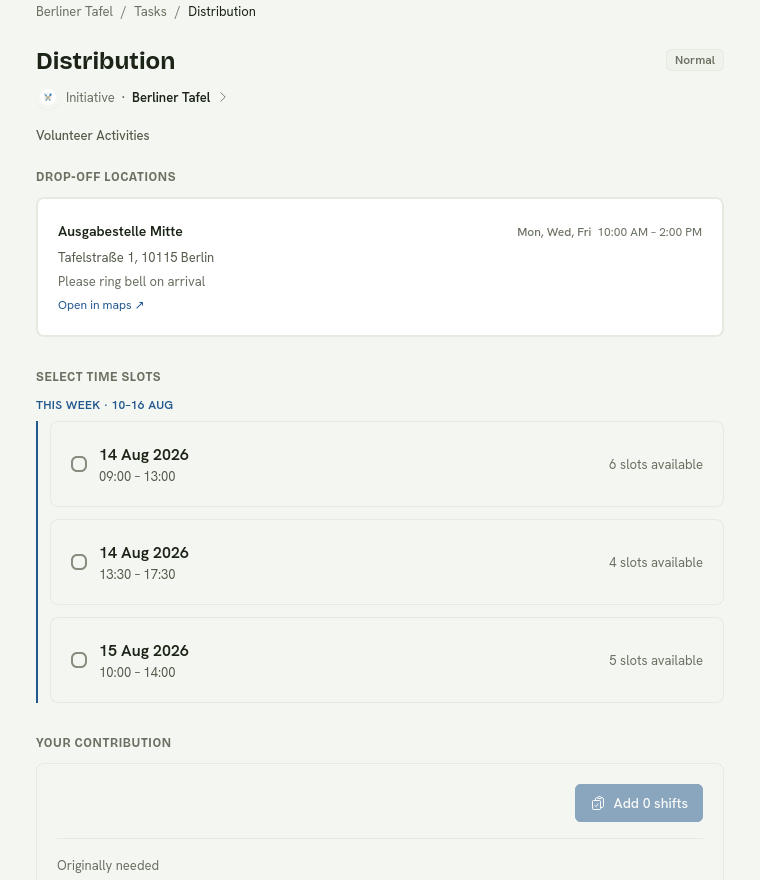
Choose only the times you can reliably attend; each selected slot becomes part of your mission.
On the day
Open the mission to see the exact time, place, and current status. Arrive on time and use the mission check-in when it opens, or ask the initiative team to check you in. After check-in, the mission is ongoing and normally completes automatically when the shift ends.
Notifications
adiuto can email you when a shift is approaching or if the initiative calls it off. You can also enable browser push notifications in your account settings.
When plans change
Cancel as early as possible so the place becomes available to someone else. If an initiative calls off the shift, all bookings on that shift are cancelled and affected volunteers are notified with a reason.
A shift booking is a commitment. The initiative uses the booked count to decide whether the activity can go ahead.